What a Local Service Update Means for Your Next Visit
A local service update can change where you go or what you bring. Learn how to identify the affected service and choose your next action.
A local service update can change where you go or what you bring, and the notice may not spell out every consequence. Read it alongside the details of your own visit: the location, service type, appointment or item involved, and the action the notice asks you to take.
Match the notice to the service you use
Local agencies often publish different notices for services that sound similar. A city’s waste collection update may not cover a private hauler, and a transit agency’s route notice may not apply to a shuttle run by a nearby institution. Identify the issuing organization, the named service and the location before treating the notice as an instruction for you.
Then compare its audience with your circumstances. Look for a named branch, street, route, account type, appointment category or group of users. If the notice refers to a broad area, check a linked map or address lookup rather than assuming your block or facility is included.
Pin down the practical change
Find the words that describe what people should do differently. A new entrance, revised booking process, alternate pickup point and temporary closure require different responses, even if the notice gives them a similar headline. Separate that action from the background explanation, which may describe why the service is changing without telling you how to use it.
Pay attention to the verbs. “Must book” signals a requirement; “may use” describes an option; “will move” identifies a change in location. Broad phrases such as “improved access” are not enough to plan a visit, so look for the concrete instructions that explain what has changed.
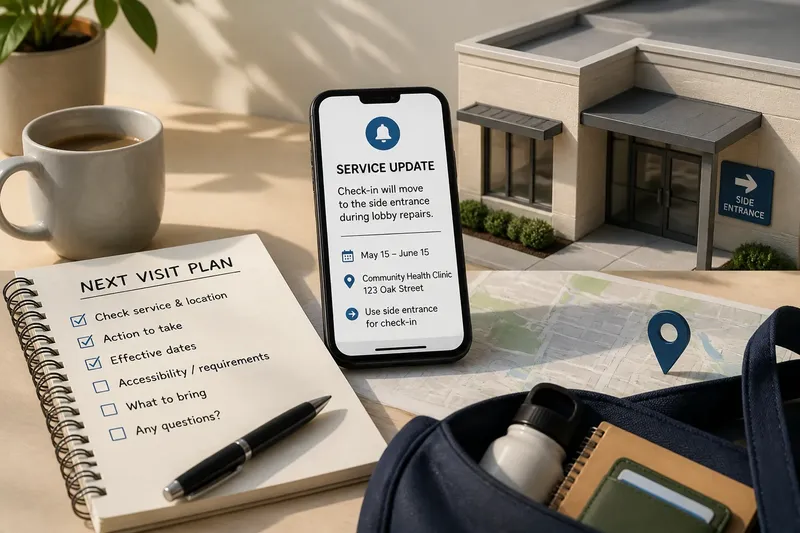
Say you have an appointment at a neighborhood clinic and receive a notice that check-in will move to a side entrance during lobby repairs. The starting details are your existing appointment and the named clinic; the action is to use the side entrance on the dates covered by the notice. If the notice does not say whether accessible entry or check-in arrangements change, contact the clinic before traveling and use its answer to decide which entrance to take.
Use dates to decide when the change applies
Distinguish the notice’s posting date from the date the new arrangement starts. “Beginning Thursday” identifies a start; “submit forms by Thursday” may be a deadline. Read the surrounding sentence to see which instruction the date modifies.
Look for an end date or a condition that controls the change, such as completion of work or the reopening of a route. “Until further notice” does not give a return date, so do not assume that an earlier schedule has resumed just because time has passed. Check the responsible service’s current page before a later visit.
Choose your next action from the notice
Use this short decision check before you leave home or submit a request:
- Check whether the named branch, street or route matches yours; if it does, follow the location-specific instruction, but if it does not, use the notice for your own service point.
- Check whether the notice names your appointment or account type; if it does, follow the stated process, but if it does not, ask the service whether your existing arrangement is affected.
- Check the effective date against the date of your visit; if the change is active then, use the new arrangement, but if it starts later, follow the current instructions for now.
- Check whether the notice gives an end date; if it does, use that date when planning a return to the usual service, but if it does not, verify the current status before relying on the old arrangement.
- Check whether a linked map, schedule or address lookup covers your location; if it does, use its specific directions, but if it does not, contact the responsible service for clarification.
- Check whether the update changes an accessibility, document or booking requirement relevant to you; if it explains the change, prepare accordingly, but if it leaves the point unclear, ask the service before making the trip.
What details do people often need to confirm?
Does the update affect an appointment I already have?
Look for wording about existing bookings, cancellations or check-in procedures. If it is silent and the appointment depends on the change, contact the service with the appointment date and location before traveling.
Where should I look for a more precise service area?
Check the notice for an official map, route schedule, branch page or address lookup. If those tools still do not identify your location, ask the agency responsible for the service rather than inferring coverage from a neighborhood name.
What if the notice does not explain an access or document requirement?
Do not assume that the usual entrance or paperwork still applies if the change could affect your visit. Ask the service a focused question that names the location, date and requirement you need to clarify.
Keep only the details you will need later
Save the service name, affected location, effective date and action in a calendar entry or phone note. Include any unresolved question beside the note, so it remains visible when you check the service page again; a saved screenshot can preserve the original wording, but it may not reflect later revisions.
For a local service update, the useful decision is often narrower than the headline suggests: whether this notice changes your particular visit. Check the service’s current instructions again before acting if the date has passed, the notice gives no end point or your unanswered question could change where you go.